Screen resumes against any job description in 15 seconds
Screenr is an AI resume screening tool that gives you a resume job description match score — a 0-100% score with a plain-English explanation — in about 15 seconds. Free during beta, no signup needed for your first match.

Screening that actually reads the resume
Screenr replaces manual side-by-side reading with a fast, consistent, and explainable comparison between a candidate and a role.
Smart resume & JD parsing
An AI model reads both documents the way a person would, pulling out the facts that matter instead of doing a keyword search.
- Name, email & phone
- Skills & certifications
- Work history & education
- Job title & responsibilities
- Required experience & education
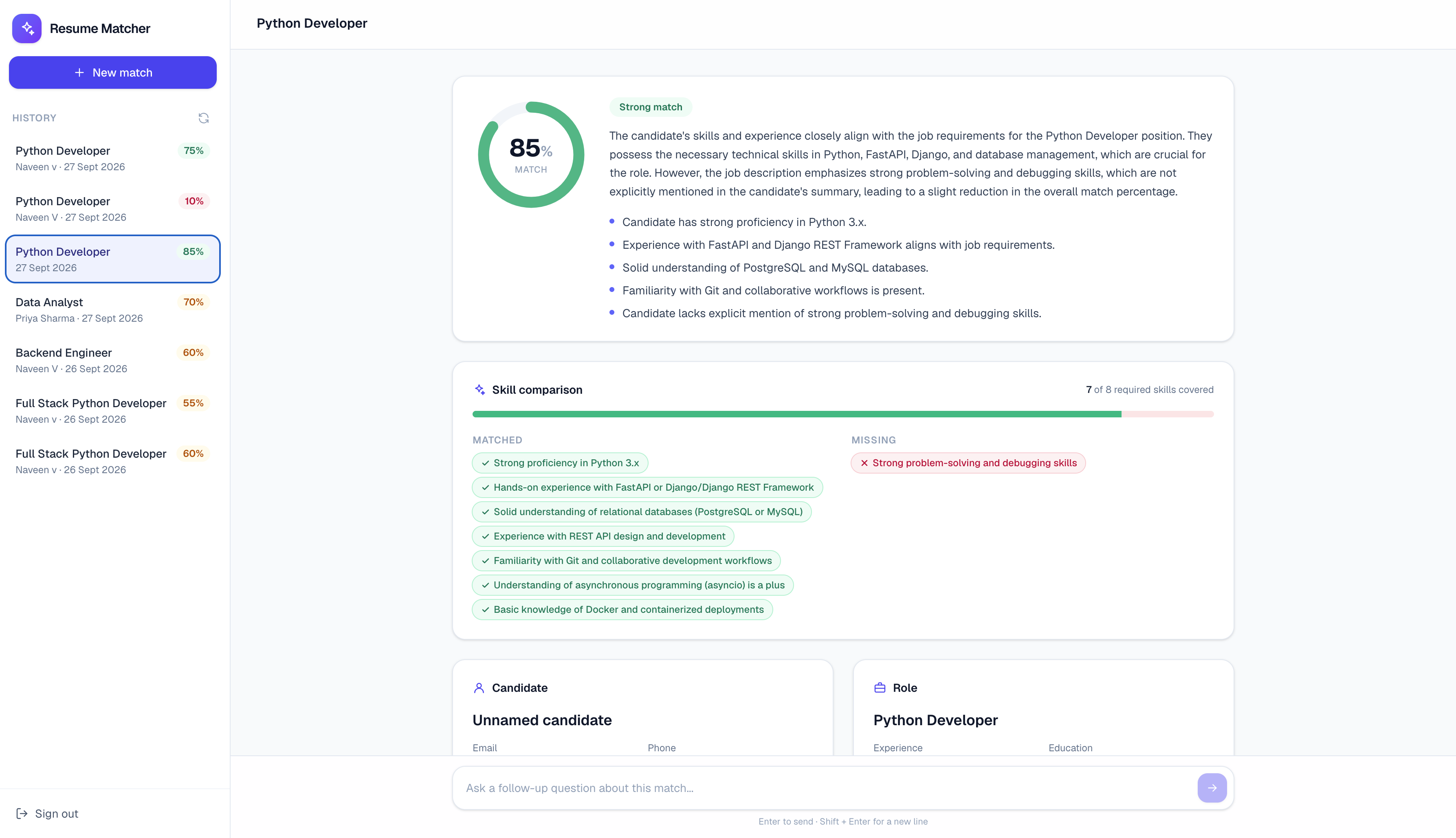
0–100% match score
A simple score with a Strong / Partial / Weak rating, a written explanation of why, and a short list of key takeaways.
- Plain-English reasoning
- Strong / Partial / Weak rating
- Key takeaways list
- Consistent across candidates
Skills gap analysis
A visual breakdown of which required skills the candidate has and which are missing, so coverage is clear at a glance.
- e.g. 6 of 8 skills covered
- Recognizes skills phrased differently
- Highlights missing requirements
- Side-by-side comparison
Live streaming analysis
Watch each step happen in real time — reading the resume, reading the job description, comparing skills, scoring the match — so it never feels like a black box.
- Step-by-step progress
- Results appear as they're generated
- Transparent reasoning
- No waiting in the dark
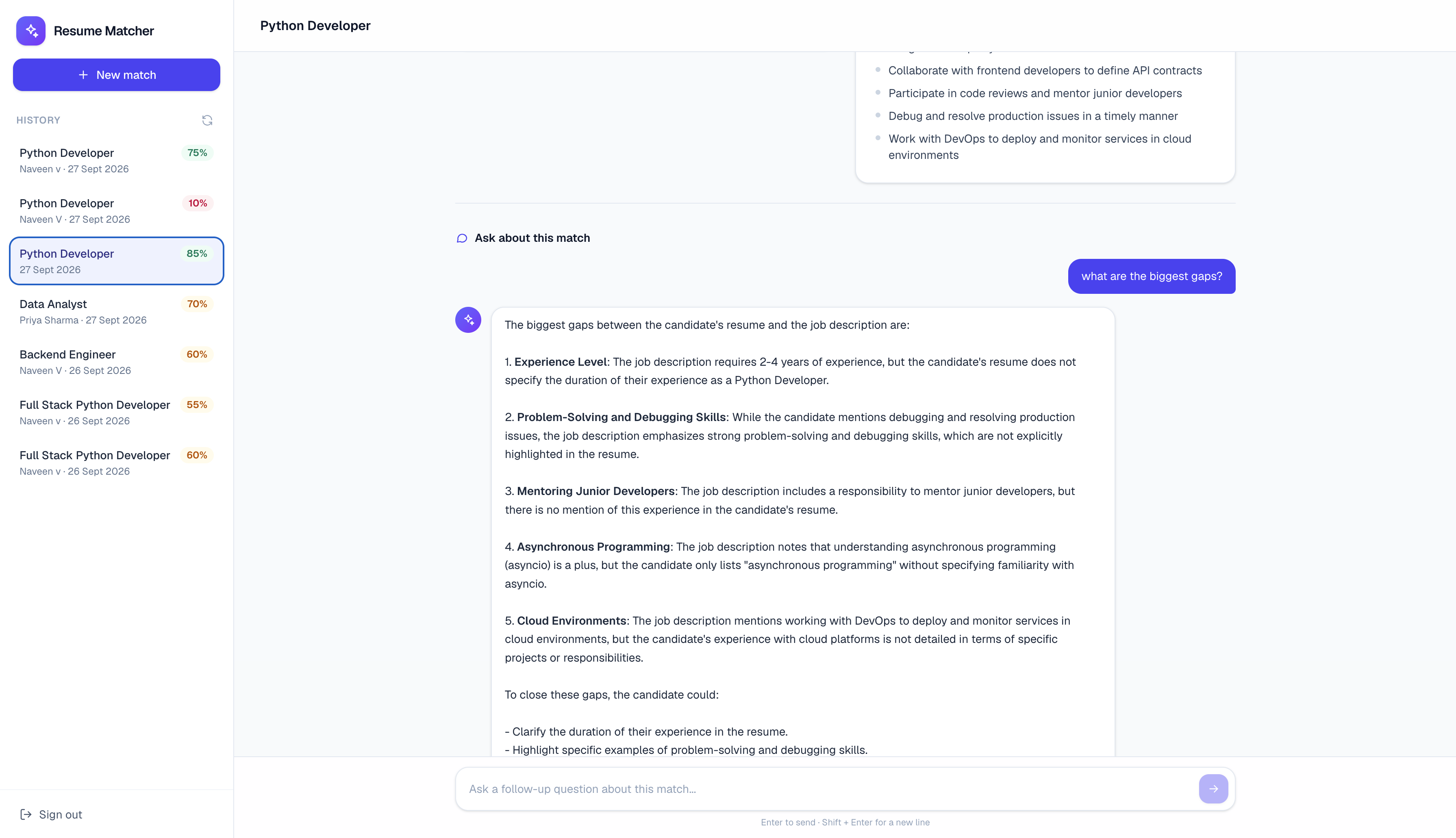
Follow-up chat
Ask questions about a specific match — "How much management experience do they have?" — and get a conversational, grounded answer.
- Context-aware Q&A
- Word-by-word streaming replies
- Scoped to the resume & role
- Refuses unrelated questions
Flexible uploads
Paste text directly or upload a file — PDF, Word, or plain text. Drag-and-drop is supported too.
- PDF, DOCX & TXT support
- Paste-as-text option
- Drag-and-drop
- Works for resume & JD
Match history
Every match you run is saved. Revisit any past comparison, along with the full conversation, whenever you need it.
- Full match archive
- Saved chat history
- One-click revisit
- Organized by candidate
Try before you sign up
No account needed to get started. First-time visitors get one full match and one round of follow-up questions, free. Pricing after that is free during beta.
- No signup required
- 1 free match + chat
- Unlimited after sign-in
- Full history once logged in
Why teams choose Screenr
Replace manual resume screening with a fast, consistent, explainable comparison — so hiring decisions start with real signal, not a skim of two documents.
Screen in seconds, not hours
No more manually reading a resume and a job description side by side. Get a clear, scored answer in about 15 seconds.
Consistent, explainable scoring
Every candidate is measured the same way, with a plain-English explanation behind the score — never a black box.
Built for recruiters & candidates
Hiring managers screen applicants faster. Job seekers check their own resume against a posting before they apply.
Ask follow-up questions
Go beyond the score with a conversational assistant that already knows the resume and the role in context.
Real understanding, not keywords
An AI model actually reads both documents, recognizing relevant experience and skills even when they're phrased differently.
Full history, always on hand
Every match and every conversation is saved, so past comparisons are a click away whenever you need to revisit them.
Find the right fit, faster
No more skimming two documents side by side to guess if someone's a fit.
A rating and a plain-English reason, not just a number.
Try a full match and a round of follow-up questions, no account needed.
How Screenr works
From upload to a clear, explainable match score in about 15 seconds.
Add resume & job description
Paste the text directly, or upload a PDF, Word, or plain text file. Drag-and-drop is supported too.
AI reads & parses both
The model extracts skills, experience, education and requirements from each document in parallel.
Compares skills & scores the match
Required skills are checked against the candidate's background, producing a 0-100% score with reasoning.
Review & ask follow-ups
See the skills breakdown, read the explanation, and chat about specifics. Every match is saved for later.
Ready to screen smarter?
Try a full match for free — no account needed to get your first result.
Try it freeWant a guided walkthrough for your team? Request a demo instead.
See Screenr in action
Schedule a personalized demo and see how a real resume and job description get scored, explained, and ready to discuss in seconds.
Request your free demo
See Screenr score a real resume against one of your open roles
Frequently asked questions
Yes — Screenr is free during beta, and your first match needs no signup at all.